The desk · Windows
One cable, and a resident.
This is the half we tested ourselves, on a machine we still have. Removal is on the alert; the minute-by-minute log is in the forensic report.
This is the half we tested ourselves, on a machine we still have. Removal is on the alert; the minute-by-minute log is in the forensic report.
Connect a listed LG monitor and Windows Update delivers two LG packages. Both are signed as drivers, co-signed by Microsoft, and neither one contains driver code. The first invents a phantom device under the monitor so the second has something to attach to. That second package carries a single instruction telling Windows to fetch LGElectronics.LGMonitorApp from the Store, and 32 seconds after delivery the SYSTEM account installs it. No window appears. No licence is shown. Nothing turns up in Programs and Features.
It qualified because the machine was ordinary: Recommended Settings accepted at setup, signed into the Store, online. Microsoft's own documentation is blunt about the result — “the automatic installation feature does not provide a notification to the user when the app is installed.”
The app's first visible act was a McAfee pop-up, a 30-day trial that renews at $39.99 for the first year. That's the business the monitor signed its owner up to.
Uninstalling the app leaves both packages in the driver store, wired to 51 hardware IDs. The next listed panel brings it all back. Both steps are here.
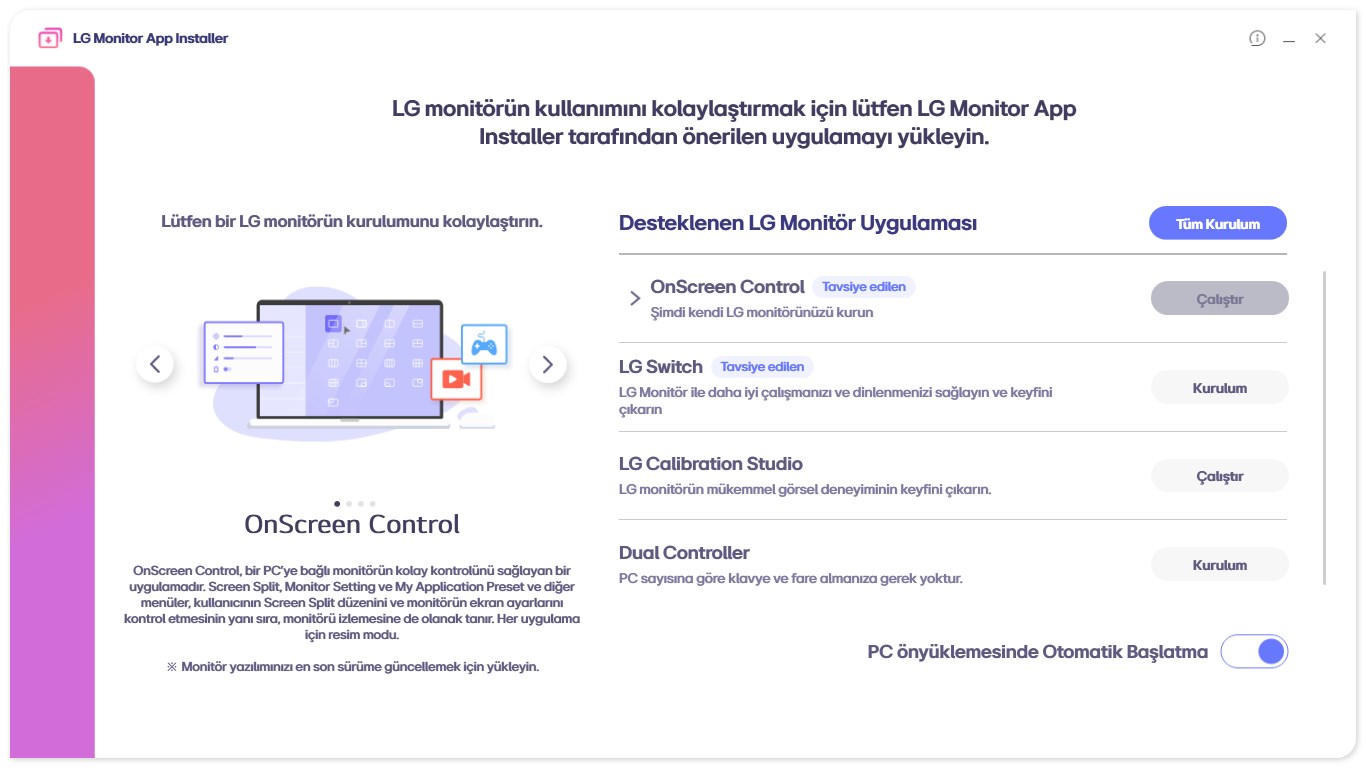
LG emailed this to outlets on July 22 rather than publishing it. Read closely, it is precise about a charge nobody made and silent on the one that matters.
“McAfee is not installed automatically and is never installed without the user's explicit consent… Under no circumstances is McAfee installed automatically or without user authorization.”
True, and beside the point. McAfee was never the thing that installed silently. LG's own app was, and McAfee is what it then put on screen.
“The LG Monitor App Installer is distributed through Microsoft's official Windows distribution process, which included McAfee as an option.”
Correct, and that is the finding. Official describes the road it travelled, not whether anyone was asked.
The installer “does not access, collect, or transmit any customer personal data.”
Open. We captured no traffic and have never claimed otherwise — our findings are about consent and persistence. One packet capture would settle it either way. Send one.
For contrast, Dell told TechSpot that current Alienware Command Center builds ask before installing and carry no third-party ads, with an opt-in prompt added in February 2025. Windows can still start that install after spotting the hardware. Same road, consent bolted on.
Twelve days after the McAfee climbdown, LG posted this on a regional support page. No press release, and as far as we can find, no coverage anywhere.
“Following customer feedback, LG removed the recommendation and does not plan to recommend McAfee or other third-party software through the Installer in future.”
“As part of its commitment to continuously improving the customer experience, LG is updating the Installer so customers can decide whether they would like to install it.”
LG, “LG Monitor App Installer,” August 3, 2026
“It” is the Installer — the app that arrives on its own. That's LG conceding the consent gap, and it goes further than the July agreement, which only ever covered the advertisement.
Forty days later nothing has shipped. The app's Store listing hasn't changed since August 12, and no version of it asks anything. The notice says nothing about the two packages in the driver store, or about the machines already carrying the app. It also claims applications “are only installed if the customer chooses to proceed,” which is true of the apps the Installer offers you and untrue of the Installer itself.
The install base was built long before anyone saw an advertisement. Microsoft's forum thread opens on November 18, 2024, and for twenty months every post is about software appearing unbidden — a repair tech in July 2025 calling it a force-installed PUP on client machines, a user in March 2026 watching it land with the blocking policies already switched on. Not one mentions advertising. The reply marked as the answer said the app was safe.
Then the first McAfee pop-up, on July 1, 2026. Every reply since is about ads. The version chain on our machine lines up with it:
Those numbers read as year and month, which puts a June 2026 build exactly where the complaints turn. Windows Latest then found an “Additional App – McAfee” entry in the Store changelog, and a changelog ships inside a build rather than being flipped on from a server. Those references have since been removed.
Still unproven: whether the advertising lives only in the build or can also be switched on remotely. The app is internet-connected and its payload can change.
Reading the Store listing and LG's terms on air, Gamers Nexus found the app “technically” holds permission to use all system resources, plus location, device data, contacts, credentials, transactions and online activity. It's a monitor utility.
runFullTrust. Re-read Sep 13: unchanged, rated 1.0 out of 5 from 431 ratings. The listing ↗There's one hardening step beyond removal, and the caveats matter more than the command. This is the value behind the Group Policy “Prevent automatic download of applications associated with device metadata.” Elevated prompt, then reboot:
reg add "HKLM\SOFTWARE\Policies\Microsoft\Windows\Device Metadata" /v PreventDeviceMetadataFromNetwork /t REG_DWORD /d 1 /fReverse it with reg delete on the same value. Same thing without the registry, on any edition: Settings → System → About → Advanced system settings → Hardware → Device Installation Settings → No.
The install chain, the version numbers and the hardware IDs come off one machine we own and haven't cleaned. The 31-of-32 boots, the permission list and the 40,000 words of agreements are Gamers Nexus's work. Whether the app transmits anything is open, and no capture exists on either side.
We build and support computers for a living. When hardware starts installing adware on our customers' machines without asking, it lands on our bench. More about CEC ↗